Driving instructor software features
Try the demo A made-up driving school to click around in – nothing to sign up for.
What I'm building for opening in 2027 – your pupils, lessons, car and finances in one place. Every feature is on every plan, including the free one (the free plan has a spreadsheet download for your accounts instead of the live QuickBooks/Xero link). If something you need isn't here, tell me: founding members help shape what I build next.
Diary, pupils and payments
Lesson diary
Day and week views, regular weekly slots, lessons of any length, and easy moving when plans change. The drive between pupils is allowed for, and you're warned when it can't be done.
Pupil records
Contact details, pick-up and drop-off points, licence and theory details, availability, experience and notes – and a parent's details where they're paying.
Lesson requests online
Pupils ask for a slot from the times you've made available. You stay in control of what's offered and what's accepted.
Payments and balances
Card payments through your own Stripe account, cash and bank transfers marked off in a tap, and one list of who owes what.
Block bookings
Prepaid hours counted down as each lesson is taught, with the balance on your screen and the pupil's.
Reminders
By text, WhatsApp or email before each lesson, with your notice period attached. "On my way" and "running late" in one tap.
Cancellations
Your notice period and late-cancellation charge applied as your terms say, with each pupil's history kept.
Waiting list and gap filling
Pupils waiting for a regular slot or wanting extra lessons. When someone cancels, the slot is offered to those nearby; the first to accept gets it.
Area days
Set which part of your patch you teach in on which days. New pupils are offered the times that fit their area, so you spend less time driving between lessons.
Helping pupils pass
A "passed" card to share
When a pupil passes their test or theory, make a picture in your school's colours with their name, "first time" and your details – ready to send them to post. Every pass shared is an advert for you.
The DVSA's 27 skills
Each pupil's level on every skill – introduced, helped, prompted, independent, reflection – marked in a few taps at the end of the lesson.
Next-lesson suggestions
Skills at a low level, and skills not practised for a while, put forward for the next lesson plan.
Mock tests and faults
Mock test results with faults by category, and the faults that keep coming back across lessons.
Theory and practical tests
Dates, centres and results, the theory certificate's expiry, and a warning when two tests clash or the car is booked for a service.
A readiness guide
Developing, nearly ready, or ready for your assessment – to back up your judgement, never to promise a pass.
A page for every pupil
Their lessons, balance, progress and what to practise, from a link in a text. They can add their own note after each lesson, and log practice with a parent.
How confident they feel
Pupils rate their own confidence on each skill. Where that differs from the level you've given – either way – it's worth a conversation.
A progress report to keep
A page a pupil can download or show a parent: hours had, skills and levels, and what's next.
The pupil's own page
What you record is what your pupil sees: their progress on the 27 skills, what to practise before next time, their lessons, theory and test dates, and what's paid for. A private link opens it on any phone – nothing to install.
I'm building this for opening day. You decide what a pupil sees, and it never predicts a pass.
Reflection 12Independent 7Still learning 8of the DVSA's 27 skills
- Roundabouts – mirrors before you signal✓ Done
- Parallel park, if someone can sit with youDone it?
Driving Instructor Booking
An early design. Priya and her figures are made up.
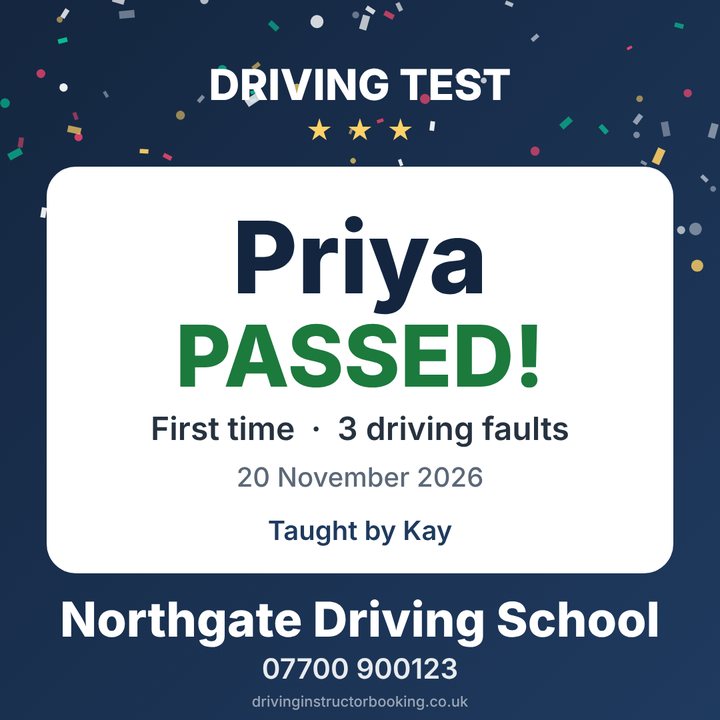
Made in the app. Priya and Northgate Driving School are made up.
A "passed" card to share
One tap when a pupil passes their test or theory: a card in your school's colours with their name, "first time" if it was, and how to find you – sent from your phone for them to share. Every pass shared is an advert for you.
Built and in the demo. You send it; they choose whether to post it.
Running the business
What each hour really earns
Lesson income less the car, fuel and your other costs – for each teaching hour and for each hour you actually work.
Income for the weeks ahead
What's already booked for the next 4, 8 and 12 weeks.
Pupils finishing, gaps opening
Who's near their test, the weekly hours that will free up, and when your diary will need new pupils.
Lost lessons and late payers
What cancellations and no-shows cost, how many slots were refilled, and who owes you.
Travel between lessons
The hours and fuel spent driving between pupils each month, and what your area days are saving.
Price review
What £1, £2 or £3 more an hour would bring in, and a prompt when your costs have risen and your prices haven't.
Pass rates and why
Pass rate, first-time pass rate, hours to test, the faults behind the fails, and DVSA's four standards check indicators – from your own pupils' results.
Prepaid hours and cash ahead
Money you hold for lessons not yet given, what's due in, and the bills coming up – so a healthy bank balance doesn't mislead you.
Business health check
One score from how full your diary is, your cancellation rate, money owed, bookings ahead and profit – with the one thing most worth fixing.
A weekly review and a monthly summary
Each week: last week's figures and three things worth doing. On the 1st: taken, spent, kept, hours taught, and lessons lost and refilled.
Growing the business
Enquiries in one list
A form for your website, Facebook page or a text. Each enquiry is answered straight away, and the ones still waiting for you are at the top – with a nudge after a day.
Where pupils come from
How each enquiry found you – recommendation, Google, Facebook, a marketplace – and which sources turn into pupils.
A review request after every pass
A congratulations message with your Google review link, sent once, when you choose.
How many new pupils, and when
The pupils likely to finish in the next 4, 8 and 12 weeks, set against your waiting list.
Pupils kept, paused and lost
Each pupil is active, paused, passed, moved on or lost touch – so a pass counts as a success, not a pupil lost.
Nothing sent without you
Offers, follow-ups and review requests go when you've approved them or switched that kind on.
Your car
Fuel log and real MPG
A photo of the receipt at the pump records the cost; add the odometer reading and you get your real miles per gallon – or miles per kWh.
Mileage from a photo
Photograph the dashboard and the odometer reading is read for you to check – no typing. The diary estimates the miles in between, with business and private miles kept apart.
Servicing, tyres and repairs
What was done, where and what it cost – and when the next service will fall at the miles you're really doing.
Tyre tread, and when new tyres are due
Note the tread depth front and rear now and then. From your own readings and the miles you're really doing, it works out how fast they're wearing and roughly when they'll reach 3mm and the legal 1.6mm – an estimate, so keep checking.
Garage time in your diary
Block out time for the service, MOT or tyres straight from the reminder. It shows in your day and week, and a lesson can't be booked over it.
MOT, insurance and road tax
Dates and costs, with reminders 60, 30 and 7 days before. Your ADI badge renewal too.
Finance or lease
Monthly payment, what's left and when it ends.
Cost per mile and per lesson
Everything the car costs, per mile and per teaching hour, fed straight into your profit figures.
Money, tax and records
Expenses with receipt photos
Fuel, insurance, franchise fees and the rest, each in a category. Regular costs are set up once and repeat.
QuickBooks and Xero linked; FreeAgent by download
On Solo and School, income and expenses go across to QuickBooks or Xero by themselves. On every plan you can download a file for FreeAgent, Sage or your accountant.
Figures by quarter
Income and expenses for each quarter and the tax year so far – to use in Making Tax Digital software or pass to your accountant. Driving Instructor Booking isn't tax software and doesn't send anything to HMRC.
Tax and VAT tracker
Your takings against the Making Tax Digital limits and the £90,000 VAT threshold, and a "put aside" percentage you choose – a guide, not tax advice.
Terms agreed and recorded
Your terms sent to each new pupil, with their agreement kept by date and version.
Change history and undo
See what changed and when, and put a mistake right in one tap.
Coming after opening
In the order instructors ask for them.
- Driving schools: several instructors and cars, pupils passed between instructors, and each instructor's share worked out
- A parent or guardian's view of lessons, payments and progress, with the pupil's agreement
- Notes by voice when you're parked, turned into a tidy lesson record
- Lesson plans suggested from each pupil's progress and past faults
- Your own website with a booking page, prices, reviews and pages for each area you cover
- Recommendations tracked, with a thank-you if you offer one, and a pass post ready to share with the pupil's permission
- Enquiries and pupils by area, next to the travel they cost you
- Income shown three ways: booked, expected from regular pupils, and possible from your waiting list
- What a week off, or a week without the car, would cost – and what to put by for the next car
- For schools: each instructor's trends and fault patterns with the number of tests behind them – no league tables
- Standards check preparation: lesson plans, reflections and training records in one place
- Lesson vouchers a parent can buy as a gift
- Intensive courses planned across several days
- A view of when changing the car starts to cost less than keeping it
On a phone, it works like an app: add it to your home screen and it opens with its own icon. The diary and end-of-lesson notes are being built to keep working when the signal drops. It also works on a computer or tablet.
Only when you're parked. Lesson notes and progress are designed for the end of the lesson, with the car stopped and secured – never while a pupil is driving.
More about the software
First month free. Then free for up to 10 pupils, or £19 a month for as many as you teach.
Your diary, pupils, payments, car and figures in one place – with reports that show what each hour really earns you. Built in the UK for UK driving instructors. The first 20 instructors keep today's prices.
Register your interest Try the demo
No card, no contract. Help from a real person, Monday to Friday, 9am to 5pm – I reply within one working day.